Step by step
-
Open Settings
It is the gray gear on the home screen.
-
Tap Appearance, then Text and display
Text size is the second slider, under Brightness.
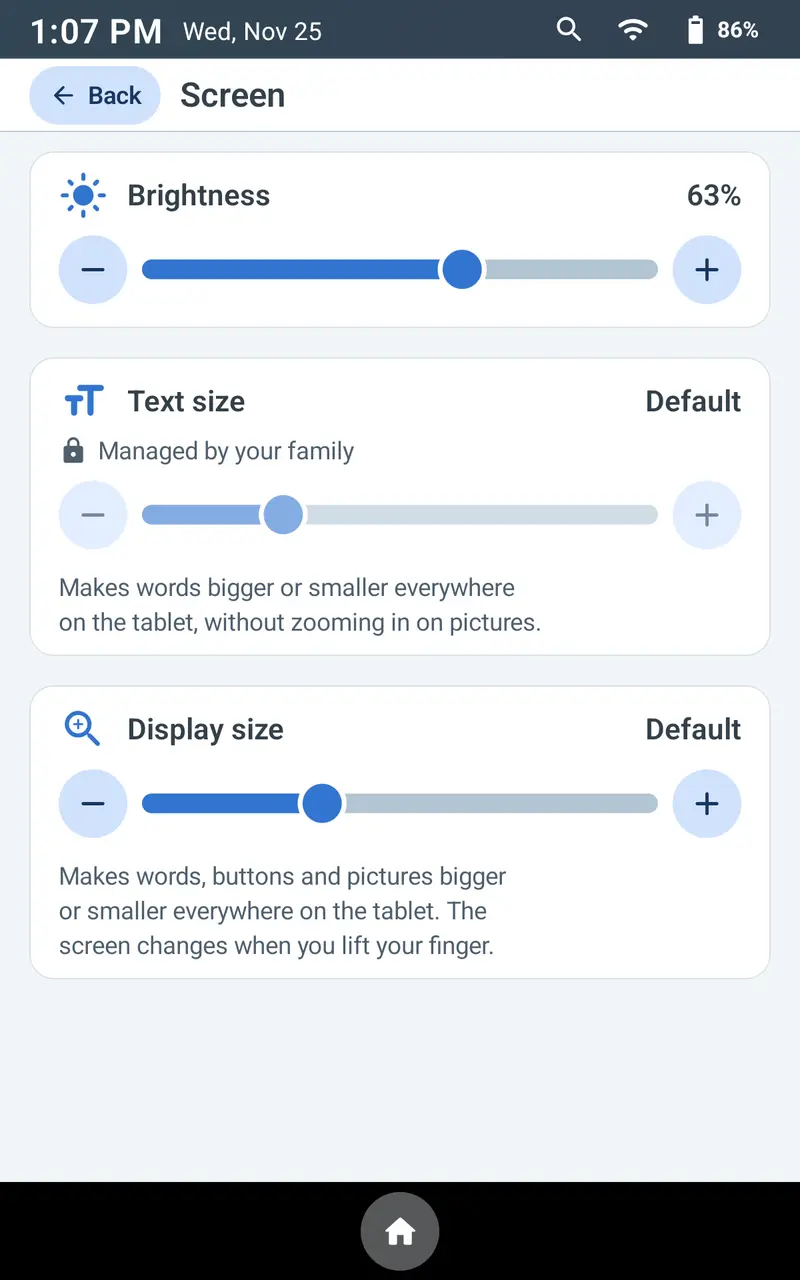
-
Tap + or −, or slide
Go from Smaller to Largest. The words change as you choose, so you can see what suits you.

You can make the tablet easier to see and hear in Settings. Every change takes effect right away, and you can always go back.
Make text bigger
- Open Settings.
- Tap Appearance, then Text and display. Text size is the second slider, under Brightness.
- Tap + or −, or slide, to choose a size from Smaller to Largest.
If it says Managed by your family, someone in your family has locked the text size so it stays as they set it. Ask them to change it for you, or see Lock settings so they stay put.
If words are still hard to read, try Display size on the same page. It makes everything on the screen bigger, including buttons.
Change the brightness
- Open Settings.
- Tap Appearance, then Text and display.
- Move the Brightness slider.
Each setting on the Text and display page has Reset to default, which puts it back the way it was.
Change the look
- Open Settings.
- Tap Appearance.
- Tap Wallpaper and choose one of the three pictures.
- Go back, tap Home screen and choose whether the bars are Blurred or Black. Black bars can be easier to read.
Change the volume
- Open Settings.
- Tap Sound.
- Move the sliders for the ringer, for videos and music, and for alarms.
The ringer is how loud calls ring. Media is the sound of videos and slideshows.
Allow calls and texts only from your contacts
- Open Settings.
- Tap Security.
- Turn on Only allow calls and texts from my contacts.
With this on, people who are not in the tablet’s contacts cannot call or text it.
Good to know
- Family members can change the screen and sound settings and the calls-and-texts setting from MySyncare. See Change tablet settings from MySyncare.
- Family can also lock settings. If a setting cannot be changed on the tablet, ask the family member who looks after it.
- For internet settings, see Connect to Wi-Fi.
Still stuck? Contact support.